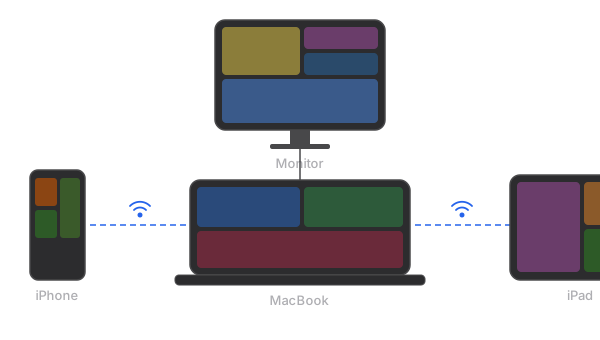
Apple Sidecar is a convenient feature when it works, but its strict compatibility requirements leave many users locked out. If your iPad is too old, your Mac predates 2016, or you want to use an iPhone as a display, Sidecar simply will not work. And Apple has shown no signs of relaxing these requirements.
This guide evaluates the best alternatives for users whose devices fall outside Sidecar's compatibility window.
Why Sidecar Does Not Work for Everyone
Sidecar requires specific hardware on both sides of the connection. On the Mac side, you generally need a model from 2016 or later. On the iPad side, you need a model with Apple Pencil support, which excludes the iPad Air 2, iPad mini 4, and earlier models. Both devices must be signed into the same Apple ID with two-factor authentication enabled.
Common reasons Sidecar fails:
- iPad is too old (pre-Apple Pencil support)
- Mac is from 2015 or earlier
- Devices are on different Apple IDs (work vs. personal)
- You want to use an iPhone, which Sidecar does not support at all
- You are running an older version of macOS or iPadOS
Alternative 1: Duet Display
Duet Display has been around since 2014, making it one of the longest-running solutions in this space. It was originally built for wired USB connections and later added wireless support as a paid feature.
Compatibility
- Works with iPads running iOS 13+, including older models Sidecar excludes
- Limited iPhone support available
- Mac and Windows support
Pricing
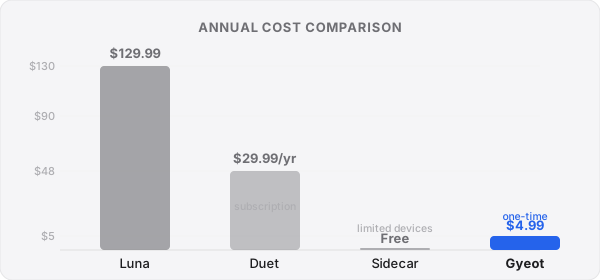
The base app allows wired connections. Wireless functionality, remote desktop features, and enhanced performance require Duet Air ($29.99/year) or Duet Pro ($39.99/year). This subscription model means ongoing costs that accumulate over time.
Performance
Wired USB performance is generally good, with low latency suitable for productivity work. Wireless performance varies depending on network conditions. Some users have reported stability issues following macOS or iOS updates, requiring app updates to restore functionality.
Alternative 2: Luna Display
Luna Display is a hardware-based solution that uses a small USB-C or Mini DisplayPort dongle plugged into your Mac. The dongle creates a dedicated hardware connection, resulting in consistently smooth performance.
Compatibility
- Works with most iPads, including older models
- Mac only (no Windows support)
- Does not support iPhones
Pricing
One-time purchase of $129.99 for the hardware dongle. No subscription fees. However, if you lose or damage the dongle, you need to purchase a replacement at full price.
Performance
The hardware approach delivers reliable, low-latency performance. The trade-off is that you must have the physical dongle with you, which is another item to pack and another port occupied on your Mac.
Alternative 3: Gyeot
Gyeot is a software-only solution that installs a virtual display driver on your Mac and streams the display to an iOS device. It focuses on three things: broad compatibility, simplicity, and working without infrastructure.
Compatibility
- Works with iPads and iPhones (unique among competitors)
- Supports older devices that Sidecar excludes
- macOS 13.2 Ventura or later
- No Apple ID restrictions between devices
Pricing
$4.99 one-time purchase. Mac companion app is free. No subscription, no hardware to buy.
Performance
Gyeot streams the virtual display over Wi-Fi or peer-to-peer. The peer-to-peer mode is a standout feature: your Mac and iOS device establish a direct wireless connection without any router. This means it works in hotel rooms, airplanes, coffee shops with problematic captive portals, or anywhere else you lack a reliable Wi-Fi network.
Comparison at a Glance
| Sidecar | Duet Display | Luna Display | Gyeot | |
|---|---|---|---|---|
| Older iPad support | No | Yes | Yes | Yes |
| iPhone support | No | Limited | No | Yes |
| No router needed | No | No | No | Yes (P2P) |
| No hardware needed | Yes | Yes | No (dongle) | Yes |
| Price | Free | $29.99/yr | $129.99 | $4.99 |
| Cross-Apple ID | No | Yes | Yes | Yes |
Which Alternative is the Best Value?
Each solution fills a slightly different niche. Luna Display is the right choice if you want hardware-grade reliability and do not mind the premium price. Duet Display makes sense if you need cross-platform Windows support and are comfortable with an annual subscription.
For most users who simply want a reliable second screen from an older iPad or an iPhone without breaking the bank, Gyeot offers the best balance of compatibility, simplicity, and price. At $4.99 with no subscription, it costs less than a single month of Duet Air. Its peer-to-peer mode adds genuine value that none of the other options provide. You can set it up in under two minutes and have a working extended display regardless of your network situation.
If your old iPad is collecting dust in a drawer and you wish Sidecar worked with it, any of these alternatives will get you a second screen. But if you want the most affordable and flexible option, Gyeot is hard to beat.